

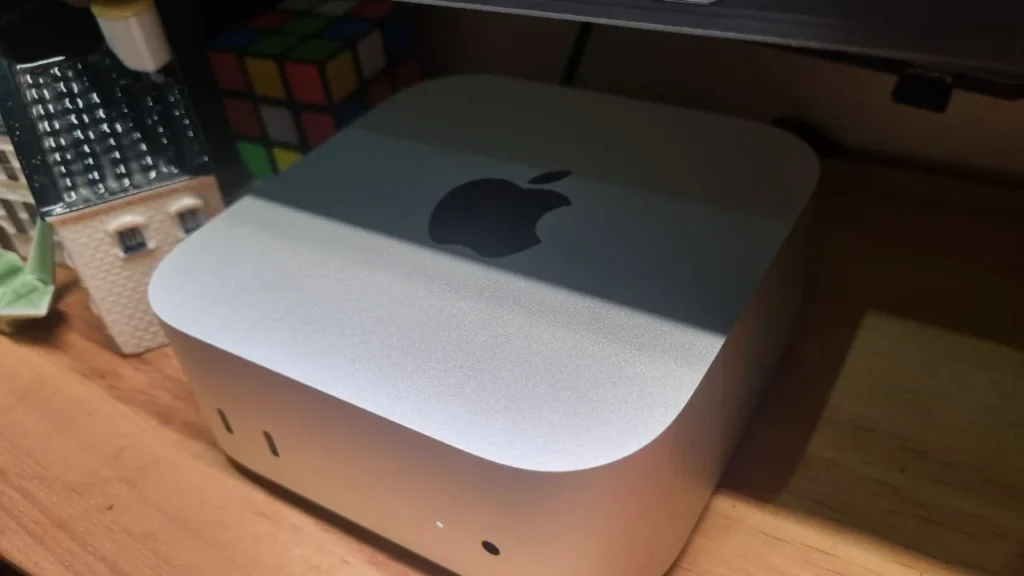

Apple has just made a big splash in the tech world by releasing their newest generation of Mac mini. Its shape is now much smaller, about the size of an Apple TV box, but its power is by no means something to underestimate. At this launch, Apple immediately offered two processor options: the regular M4 and the M4 Pro.
For those of you who are planning to buy a new computer, you must have felt confused about which one to choose. Especially since from the outside, the physical shape of these two tiny computers is exactly the same with no differences. Well, in this article we will thoroughly discuss the fundamental differences between these two machines. The goal is so you don’t make the wrong choice, don’t waste money, and of course, match your daily work needs.
Identical External Design
When it comes to physical form, you are guaranteed not to find any difference between the Mac mini M4 and the M4 Pro. Both feature a new design that is super compact and looks very elegant. Their size has shrunk dramatically compared to the previous generation of Mac mini. This computer is guaranteed not to take up much space on your desk.
Now the power button has been moved to the bottom of the device. And the best part is that there is now a row of ports on the front. This is a change many people have been waiting for. We no longer need to fumble around the back of the computer just to plug in a flash drive or phone charger. So, whether you buy the Pro version or the regular version, the person next to you won’t be able to tell the difference just by looking from the outside.
Machine and Processor Performance
This is where the most significant difference lies. The regular M4 chip is actually already very fast and reliable for daily routines. If you only use the computer for typing documents, making presentations, opening dozens of tabs in a web browser, or just watching high-resolution movies, the M4 chip feels more than sufficient. Even if you want to do light video editing for social media content like TikTok or Instagram, the M4 machine can still handle those tasks very comfortably.
On the other hand, we have the M4 Pro, which is like a monster deliberately caged inside a small box. The M4 Pro is specifically designed for true professionals. The term ‘professional’ here means people whose work demands very heavy computing power every day. For example, you are a video editor who often edits 4K or even 8K videos with many complex visual effects added. Or perhaps you are a programmer who frequently compiles large amounts of code. 3D designers who need super-fast rendering times will also benefit greatly. The M4 Pro has a much higher number of processor cores, so its speed can be more than double that of the regular M4 when used for heavy work.
RAM and Storage Capacity
There is very good news for Apple product fans this year. Apple has finally decided to move away from their old habit of always providing 8GB of RAM. The cheapest variant of the regular Mac mini M4 now comes with 16GB of RAM. This is a very suitable and comfortable capacity standard for using applications in today’s era. This RAM capacity can still be increased to a maximum of 32GB if you are willing to pay extra at the time of initial order. For data storage, this regular version starts at 256GB.
Now, what about the M4 Pro version? This expensive variant starts with a much higher standard, with built-in RAM of 24GB. This capacity is very generous and will certainly prevent your computer from slowing down easily, even if you open many heavy applications simultaneously. If you happen to have a very large budget, the RAM on the M4 Pro can be increased to a maximum of 64GB. The minimum data storage is also larger, starting directly at 512GB and can be maxed out to a massive 8TB capacity. There is one important thing you must always remember: you cannot disassemble and add RAM or storage yourself after buying this computer. So you have to think carefully about these capacity choices from the very beginning.
Connectivity and Ports on the Back
As we discussed earlier, there are ports on the front consisting of two USB C ports and one audio jack for earphones. The speed difference between these two devices becomes very clear at the back. The regular Mac mini M4 comes equipped with three Thunderbolt 4 ports. Its data transfer speed is already very fast, and this is very suitable for moving large files to your daily external hard drive.
However, the Mac mini M4 Pro takes a much more advanced technological step. This computer is equipped with three ports that use the new Thunderbolt 5 technology. This is a very new standard with data transfer speeds reaching more than double that of the previous generation. If you often work with studio-grade external storage or need to connect advanced recording equipment that requires massive bandwidth, the benefit of Thunderbolt 5 will be very noticeable. Aside from that difference, both types of Mac mini still kindly provide a standard HDMI port and an ethernet port for a more stable network connection.
Ability to Connect Additional Displays
For those of you who are used to and enjoy working with multiple monitors at once, both Mac minis have commendable capabilities. The regular Mac mini M4 can support the use of up to three displays simultaneously. In detail, this computer can handle two 6K resolution displays plus one 5K resolution display. This is a very luxurious visual capability for the average computer user.
Meanwhile, the M4 Pro also supports up to three external displays simultaneously with even more extreme quality. The difference is that the M4 Pro can handle monitors with much higher resolution and refresh rates without issues. The M4 Pro can be connected to a single massive 8K resolution display. You can also connect it to a 4K resolution display but with a very high refresh rate of up to 240Hz. Extra capabilities like this are usually highly sought after by gamers or video color specialists who need the smoothest, lag-free visual accuracy.
The Very Decisive Price Issue
This is usually the point that confuses many people the most: discussing the budget or price. The regular Mac mini M4 is sold at a very tempting price. With built-in RAM of 16GB, its starting price is much more affordable compared to buying any current Apple laptop model. This automatically makes the Mac mini M4 the desktop computer with the best value for money. This computer is very suitable for students, office workers, or simply as a family computer at home.
On the other side, the Mac mini M4 Pro has a selling price that can soar very high. Because its machine specifications are designed specifically for heavy workloads, the price of this Pro variant can be twice as expensive as the standard version. Not to mention if you are tempted to add extra RAM or increase storage capacity when ordering on their official website. The price can balloon dramatically to the equivalent of buying a new motor vehicle.
Comparison Table of Mac Mini M4 vs Mac Mini M4 Pro
| Feature & Specification | Mac mini M4 Standard | Mac mini M4 Pro |
|---|---|---|
| Processor Chip | Apple M4 | Apple M4 Pro |
| Maximum CPU Cores | 10 Cores | 14 Cores |
| Maximum GPU Cores | 10 Cores | 20 Cores |
| Base RAM Capacity | 16 GB | 24 GB |
| Maximum RAM Limit | 32 GB | 64 GB |
| Base Storage | 256 GB | 512 GB |
| Maximum Storage Limit | 2 TB | 8 TB |
| Rear Thunderbolt Ports | 3 Thunderbolt 4 ports | 3 Thunderbolt 5 ports |
| External Display Support | Up to 3 Displays | Up to 3 high resolution displays |
| Data Transfer Speed | 40 Gbps | 120 Gbps |
| Suitable Users | Students, office workers, home users | Video editors, designers, professional class |
Final Conclusion: Which One to Choose?
So, after reading all the comparisons above, which device should you choose? If you are a general computer user who needs a machine for daily activities. For example, for doing college assignments, completing office reports, answering emails, or just for entertainment at home with your beloved family. Then the regular Mac mini M4 is the smartest choice. Its price is very wallet-friendly, its performance is very snappy, and the 16GB RAM capacity is very safe for keeping the computer responsive for years to come. You don’t need to bother spending extra money on features you probably won’t ever use to their full potential.
But it is a different story if the computer is a primary money-making tool for you. For example, you work in the creative industry where speed is paramount, you are a visual effects specialist, or a professional musician who needs absolute stability and quiet operation. Then buying the Mac mini M4 Pro is a very accurate work investment. In the professional world, time is money. The M4 Pro device will certainly save you many hours of work every single day. All that efficiency can be realized thanks to its extremely powerful processor performance and state-of-the-art connectivity technology.
Make sure you match your new computer choice with your financial situation and the type of daily work you do. Don’t let mere pride make you buy the Pro version when the computer will only be used for typing ordinary documents. Good luck weighing your options, and I hope this article helps you make the most satisfying purchasing decision.