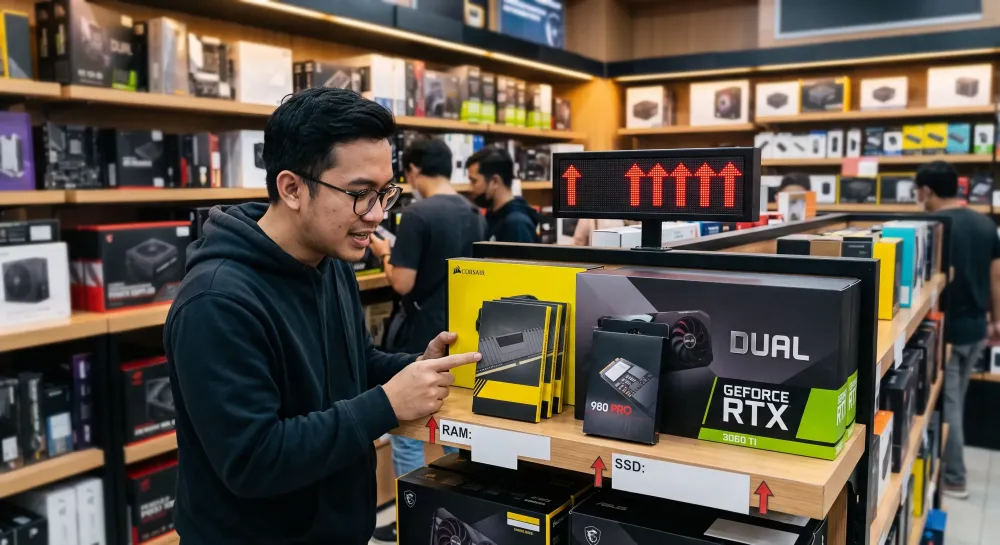
PC component prices are indeed often hard to predict. Sometimes RAM and SSD prices drop quite significantly, then a few months later they go up again. GPUs are equally hard to predict because they are influenced by many factors, from stock, market demand, the dollar exchange rate, to the launch of the newest generation.
If you're planning to build a PC or upgrade a computer, this kind of situation can be confusing. Buy now and you're afraid of overpaying, but wait too long and prices may not necessarily come down.
Here are some tips you can follow when PC component prices are rising.
1. Determine Which Components You Really Need
Don't immediately upgrade all components just because you want your PC to feel newer.
First, check your main needs.
For example:
- PC is slow when opening many applications → RAM may need to be increased.
- Games or applications take a long time to load → SSD could be a priority.
- Low FPS in games → the GPU may need to be upgraded.
- CPU is always at 100% → the problem might actually be in the processor.
By setting priorities, your budget can be focused on the components that provide the most noticeable improvement.
2. Don't Chase the Highest Specifications
When component prices are high, chasing the highest specifications usually doesn't make much sense from a price standpoint.
For example, for typical gaming use, 32 GB of RAM is probably more than enough. There's no need to force 64 GB just because the motherboard supports it.
The same applies to SSDs.
Instead of buying a 4 TB SSD at a high price, it might make more sense to buy 1 TB or 2 TB first. You can add more capacity later when prices are more stable.
The principle is simple:
buy based on needs, not on maximum specifications.
3. Compare Prices from Several Stores
PC component prices can vary quite significantly from one store to another.
Before buying, compare prices through:
- Marketplaces
- Local computer stores
- Authorized distributors
- Computer store websites
- Credit card or e-wallet promotions
But don't just look at the cheapest price.
Also pay attention to the store's reputation, warranty, product condition, and whether the product is officially sourced or from a distributor.
A slightly higher price can sometimes still be reasonable if the warranty is much clearer.
4. Monitor Prices Before Buying
If the purchase isn't urgent, don't immediately check out when you see a price.
Monitor it for a few days or weeks first.
That way, we can determine whether the price is actually normal, rising, or just temporarily raised by the seller.
One common mistake is buying because you're afraid prices will rise again, only to see prices drop a few days later.
There's no need to try too hard to find the absolute lowest price. The important thing is to get a price that is still reasonable given current market conditions.
5. Consider the Previous Generation
The latest generation components are certainly attractive, but that doesn't mean the previous generation immediately becomes bad.
Previous-generation GPUs, for example, often still perform very well for 1080p or 1440p gaming.
The same goes for CPU platforms.
Sometimes using a platform from the previous generation can save money on:
- Motherboard
- RAM
- Processor
- Cooler
The performance difference isn't necessarily as large as the price difference.
Therefore, always look at price-to-performance, not just the generation number.
6. Don't Be Too Fixated on One Brand
If components from your favorite brand are expensive, look at other alternatives.
For SSDs, for example, don't just look for a specific brand. Many manufacturers offer products with similar specifications and performance.
The same goes for RAM.
As long as the specifications match, using a different brand isn't a problem.
What's more important to pay attention to are:
- Warranty
- Speed
- Capacity
- NAND or DRAM type for SSDs if necessary
- RAM timing and frequency
- Cooling quality
- Product reputation
Being a bit flexible on brand can help you save quite a bit of budget.
7. Upgrade Gradually
Not all components need to be bought at once.
If prices are high, upgrading your PC gradually can be a safer option.
For example:
First, buy an SSD because your storage is full.
A few months later, add more RAM.
After GPU prices improve, then upgrade the GPU.
This approach makes the expenses less heavy at once and gives you the opportunity to wait for better prices on certain components.
8. Pay Attention to the Platform Before Upgrading RAM
For RAM, don't just buy it because you see a promotional price.
First, make sure of the type of RAM your motherboard uses.
Currently, some platforms use DDR4, while newer platforms use DDR5.
If you plan to replace your motherboard and processor in the near future, reconsider whether buying a large amount of RAM for an old platform still makes sense.
Sometimes it's better to hold off on minor upgrades and save your budget to move to a new platform all at once.
9. For SSDs, Don't Just Look at the Speed on the Box
An SSD with figures like 7,000 MB/s does look attractive.
But not all users need an SSD that fast.
For typical uses such as:
- Windows
- Gaming
- Browsing
- Office
- Light editing
The difference between a mid-range NVMe SSD and a flagship SSD is often not very noticeable in everyday use.
If SSD prices are rising, mid-range products usually offer better value.
It's better to get sufficient capacity with good performance than to chase the highest benchmark but end up with too little capacity.
10. GPUs Should Be Bought Based on Your Target Resolution
GPUs are usually one of the most expensive components in a gaming PC.
Therefore, don't buy a GPU just based on its performance ranking.
First, determine your gaming target.
1080p Gaming
There's no need to buy a flagship-class GPU if the majority of your games are played at 1080p.
1440p Gaming
Look for a mid-range to upper-mid-range GPU that can deliver FPS matching your monitor's refresh rate.
4K Gaming
Only then do high-end GPUs become more relevant, especially for AAA games.
By determining your target resolution first, you can avoid buying a GPU that is actually too expensive for your own needs.
11. Consider Used Components, But Be Selective
The used goods market can be an alternative when new prices are high.
Some components are relatively safe to buy used if they're in good condition, such as:
- RAM
- CPU
- Cases
- Coolers
- GPUs
But you still need to be careful, especially with GPUs.
If buying a used GPU, check:
- Temperature under load
- Fan condition
- Artifacts
- HDMI or DisplayPort ports
- Physical condition
- Usage history if available
- Remaining warranty
For used SSDs, you should also check the drive's health status and the amount of data written.
Don't buy used items just because they're cheap.
12. Avoid Panic Buying
When news emerges that RAM, SSD, or GPU prices are going to rise, many people immediately buy.
Yet price predictions for components are not always accurate.
If you actually need the component now and the price still fits your budget, buying is certainly not a problem.
But if you don't actually need it yet, don't buy just because you're afraid prices will rise.
Hardware prices always move.
After going up, they can stabilize. After stabilizing, they can go down. Then they can go up again.
No one can truly pinpoint the exact moment of the lowest price.
13. Leave Budget for Other Components
When building a PC, don't let your entire budget be spent only on the CPU and GPU.
There are still other important components such as:
- Power supply
- Motherboard
- SSD
- RAM
- Cooling
- Case
- Monitor
Especially don't skimp too much on the power supply just to get a GPU that is one class higher.
A PC with balanced specifications is usually much more comfortable to use than a PC with one very powerful component but the rest too cheap.
14. Set a Price Limit Before Shopping
A simple way to avoid impulsive purchases is to set a price limit.
For example:
I will buy a GPU if its price is below Rp5 million.
If the price is still Rp5.5 million and the upgrade isn't urgent, wait.
But once the price is within what you consider reasonable, don't wait too long hoping for it to drop another Rp100,000 or Rp200,000.
Chasing the absolute lowest price can also lead you not to buy for months.
15. If Your PC Is Still Enough, Waiting Isn't Wrong Either
Not every price hike has to be countered by looking for alternatives.
Sometimes the best decision is indeed not to buy anything first.
If your current PC can still handle work and games well, just keep using it until market conditions are more attractive.
The budget that would have been used for components can be saved. When prices improve or a new generation comes out, the available options usually increase as well.
Conclusion
Facing rising prices for RAM, SSDs, GPUs, and other PC components doesn't actually have to make us rush to buy.
The most important thing is to know your own needs.
Prioritize the components that truly provide a real improvement, compare prices, consider the previous generation, and don't be afraid to upgrade gradually.
In the hardware world, there are almost always new products and new prices.
Therefore, instead of trying to guess when prices are at their lowest point, it's better to find the point where price, performance, and our needs feel reasonable.
If your PC can still meet your needs, waiting is a valid choice. But if an upgrade is truly necessary and the price still fits your budget, don't be too afraid to buy just because you hope prices will drop further.