What Is Docker?
If you often deal with the world of programming, web development, or servers, chances are you have heard the term Docker.
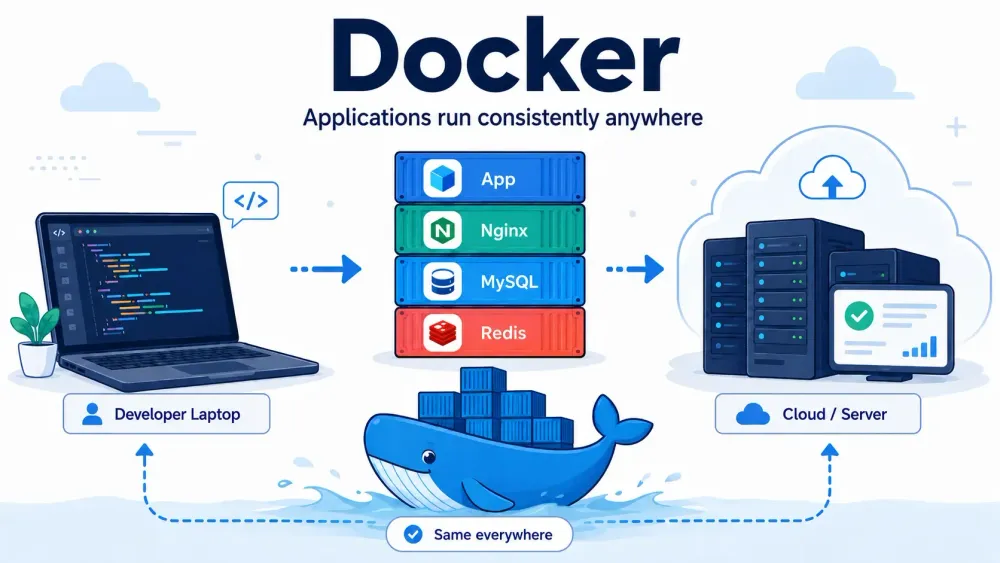
Docker is a platform that allows us to run applications inside environments called containers.
Simply put, Docker helps us package an application along with everything it needs, such as libraries, dependencies, configurations, and specific runtime versions.
So when that application is moved from a developer's laptop to a server, the likelihood of issues like:
"It works on my laptop, but why is it throwing an error on the server?"
can be significantly reduced.
Docker makes application environments much more consistent.
What Is a Container?
A container can be imagined as a special box for an application.
Inside that box lies the application along with everything required for it to run.
For example, suppose we have a Laravel application that requires:
- PHP 8.3
- MySQL
- Redis
- Nginx
- Composer
Instead of installing everything one by one on the computer, we can use Docker to run all those requirements in their respective containers.
The structure looks roughly like this:
Laravel Application
│
├── PHP Container
├── Nginx Container
├── MySQL Container
└── Redis Container
All these containers can connect with each other and work as a single system.
Docker Is Not a Virtual Machine
Docker is often considered the same as a Virtual Machine or VM.
In fact, the two are different.
Virtual Machines usually run a complete operating system inside a computer.
For instance, if we are using Windows and then run Ubuntu via VirtualBox.
VMs require quite large resources because they have to run a complete operating system.
Docker is lighter because containers use the kernel of the host operating system.
A simple illustration looks like this:
Virtual Machine
Hardware
↓
Operating System
↓
Virtual Machine
↓
Guest Operating System
↓
Application
Docker
Hardware
↓
Operating System
↓
Docker
↓
Container
↓
Application
Therefore, Docker is typically faster to create, run, stop, and delete compared to Virtual Machines.
Why Is Docker Widely Used?
There are several reasons why Docker is currently very popular among developers.
1. More Consistent Environment
One of the classic problems in development is environment discrepancies.
For example, the first developer uses:
PHP 8.2
The second developer uses:
PHP 8.3
Meanwhile, the production server uses:
PHP 8.1
Small differences like this can sometimes cause application errors.
With Docker, the environment version can be determined from the start.
For example:
FROM php:8.3-fpm
That way, all developers can run the application using the exact same PHP version.
2. Easier Project Setup
Imagine you just joined a new project.
Normally, you might have to install:
PHP
Composer
MySQL
Node.js
Redis
Nginx
Not to mention ensuring that the versions match.
With Docker, you usually only need to run a command like:
docker compose up -d
Docker will then run the services defined by the project.
Development setup becomes much more practical.
3. Reducing the "Works on My Machine" Problem
Developers have definitely experienced a situation like this:
Developer A:
"The application works on my laptop."

Developer B:
"It throws an error on my laptop."

Server:
"It won't run here at all."
Such problems usually arise due to environment differences.
Docker helps ensure the application runs in nearly identical environments across:
- developer's laptop,
- other developers' computers,
- staging server,
- production server.
4. Easy to Run Multiple Services
Modern applications usually require more than a single service.
For instance, an application might need:
Backend      → Laravel
Database     → MySQL
Cache        → Redis
Web Server   → Nginx
Queue        → Laravel Queue Worker
With Docker Compose, all these services can be configured in a single file.
For example:
services:
  app:
    build: .

  mysql:
    image: mysql:8

  redis:
    image: redis:latest

  nginx:
    image: nginx:latest
After that, you simply run:
docker compose up -d
Docker will run all of those services.
For a list of other complete commands, you can read the guide on how to view docker container logs that we have summarized.
Conclusion
Docker is a platform that allows us to run applications inside containers with a more consistent environment.
Instead of installing PHP, MySQL, Redis, Nginx, and various dependencies manually, we can define everything using Docker.
The biggest advantage is that the development environment becomes much easier to move, share, and run on other devices.
The main concepts to understand when starting to learn Docker are:
- Docker Image as a template.
- Container as a running application.
- Dockerfile as instructions for building an image.
- Docker Compose for managing multiple containers.
- Volume for storing data.
- Network for communication between containers.
If you frequently develop applications that require many services or work with a team of developers, Docker is definitely a tool well worth learning.