

Ever felt tired after a full day of typing or navigating in front of a computer screen? If so, it might be time to pay attention to your main tools. The right keyboard and mouse choices greatly affect our daily comfort and work speed. Especially if you often deal with lines of programming code, write long blog articles, or manage multiple websites from your desk. Well, this time we will discuss a device package often referred to as the highest tier for productivity. That package is the Logitech MX Keys S Combo.
As the name suggests, this is not just an ordinary keyboard or mouse. Logitech deliberately combined two of their flagship products into one very attractive complete package. For those of you who want to know more before deciding to upgrade your desk setup, let's break down one by one what you will get and what amazing features are offered.
What's Inside the Box?
When you buy the Logitech MX Keys S Combo, you don't just get one device. Inside the box, you'll be greeted by several essential accessories ready to accompany your busy work hours.
First, of course, there's the Logitech MX Keys S keyboard. This is the star for typing. Second, you'll find a very important additional accessory: a palm rest. This wrist rest is specially designed with soft material to reduce wrist fatigue when typing for long periods. Third, you also get the Logitech MX Master 3S mouse. This mouse is very popular among professionals due to its unique design and highly responsive capabilities. Finally, Logitech also includes a Logi Bolt dongle. This dongle is a next-generation signal receiver that offers much more stable wireless connectivity.
Advanced Features of the Logitech MX Keys S Keyboard
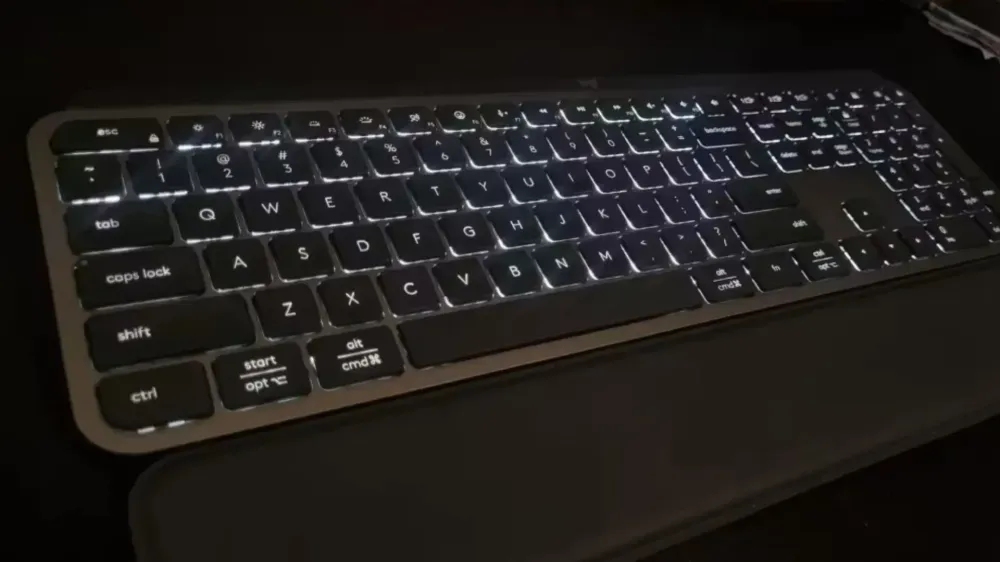
Let's start by discussing the keyboard first. The Logitech MX Keys S has a very elegant, slim, and minimalist design. Its appearance is very suitable for a modern desk. However, its beauty is not just on the outside. There are many advanced features hidden inside.
One thing that is most noticeable when first using this keyboard is the comfort of the keys. Logitech calls this technology Perfect Stroke. If you look closely, each key on this keyboard has a slight spherical dished indentation in the center. This indentation is designed to fit the shape of our fingertips. As a result, every keystroke feels very precise, smooth, and completely quiet. You can type thousands of words or lines of code without disturbing those around you.
In addition, this keyboard is equipped with a smart backlight. This backlight has a very responsive proximity sensor. When your hands approach the keyboard, the lights automatically turn on to greet your fingers. When your hands move away and stop typing, the lights slowly turn off by themselves to save battery. The brightness level can also adjust automatically to the lighting conditions of the room where you work.
Another standout feature is its ability to connect to up to three different devices simultaneously. There is a dedicated Easy Switch button that allows you to switch from a Windows laptop to a macOS device or even an Android tablet with just one press. Imagine how practical it is to reply to a work message on a tablet and then immediately go back to typing on your laptop without moving your hands from the keyboard. For power, it charges via a USB Type-C port. The battery can last up to ten days with the backlight fully on, or up to five full months if the backlight is turned off.
The Excellence of the Logitech MX Master 3S Mouse

Now we move on to its companion, the Logitech MX Master 3S. This mouse has a physical shape that might look a bit strange to some people at first glance. However, its shape is deliberately designed ergonomically to follow the natural contours of the human palm. With this high rounded design, your hand will rest in the most relaxed position. This posture greatly helps prevent cramps, fatigue, or hand injuries even if you have to work from morning until late at night.
The most iconic and beloved feature of this mouse is the scroll wheel that uses MagSpeed Electromagnetic technology. This wheel is made of solid steel, giving a very premium feel when touched. You can scroll through web pages or long documents up to a thousand lines in just one second. Interestingly, this steel wheel can spin very fast yet virtually silently. This feature is clearly a lifesaver when you have to read very long report documents or find errors in lines of code.
The Logitech MX Master 3S also brings a major upgrade on the optical sensor side. This mouse uses an advanced 8K DPI resolution sensor. That means its sensitivity and accuracy are very high. This sensor can even work smoothly on any surface, including on a clear glass desk, which is usually a major enemy for ordinary optical mice. You no longer need to bother carrying a mouse pad everywhere.
Another advantage that users really like is the left and right click buttons which are designed to be very quiet. Logitech claims the click sound is drastically reduced compared to the previous series. You can still feel a solid click feedback on your finger, but the tapping sound is almost inaudible. This mouse also features a thumb wheel on the left side for horizontal scrolling. Its battery life is also impressive. With a full charge, this mouse can last up to seventy days of operation.
Seamless Connection and Logi Options Plus Software
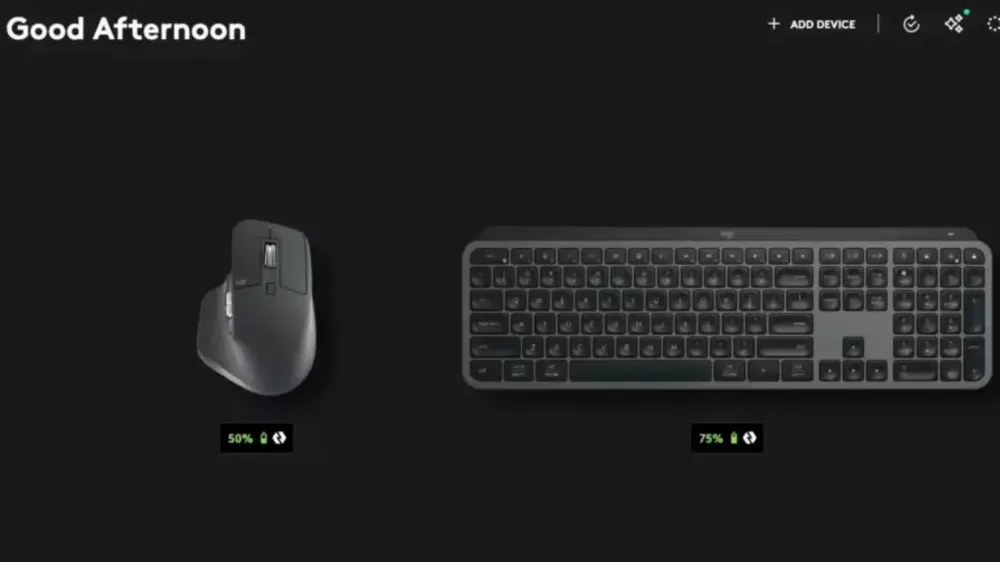
As mentioned in the opening, this package includes a Logi Bolt receiver dongle. The wireless technology of Logi Bolt is specifically designed to overcome connection dropouts in dense radio frequency environments. For example, if you are working in a cafe full of people using Bluetooth devices and congested Wi-Fi connections, Logi Bolt ensures that the transmission from your keyboard and mouse remains smooth without any delay or lag. This technology is also encrypted with high standards, so your keystroke data is much more secure.
To maximize all the potential of this hardware, it is highly recommended to install a free software called Logi Options Plus. In this smart application, you can change the functions of various buttons on the mouse and keyboard as you wish. Even better, these button settings can be customized specifically for each application you are using.
There is also a flagship feature called Smart Actions in the app. This feature allows you to create automatic shortcuts for a series of repetitive tasks you routinely do. As a simple example, you can set a special key on the keyboard to directly open a web browser, launch a word processing app, and turn on your favorite music player simultaneously when you first sit down to start work in the morning.
Conclusion: Is This Combo Worth It?
The Logitech MX Keys S Combo is a very valuable work tool investment for anyone who spends most of their productive time in front of a monitor. Although the purchase price may seem much higher than standard computer peripherals, the level of comfort and time efficiency you will get is well worth the price. The perfect combination of a quiet and comfortable keyboard, a well-supporting palm rest, a super ergonomic mouse, and very stable connectivity can truly change your workflow to be faster, healthier, and more enjoyable every day.
Related Articles
XRing O3, Xiaomi's Flagship Chip Getting More Serious in Rivaling Snapdragon


Written by
Wilan
A regular contributor to Bali Island Tekno who actively shares knowledge about technology, programming, and the world of software engineering.