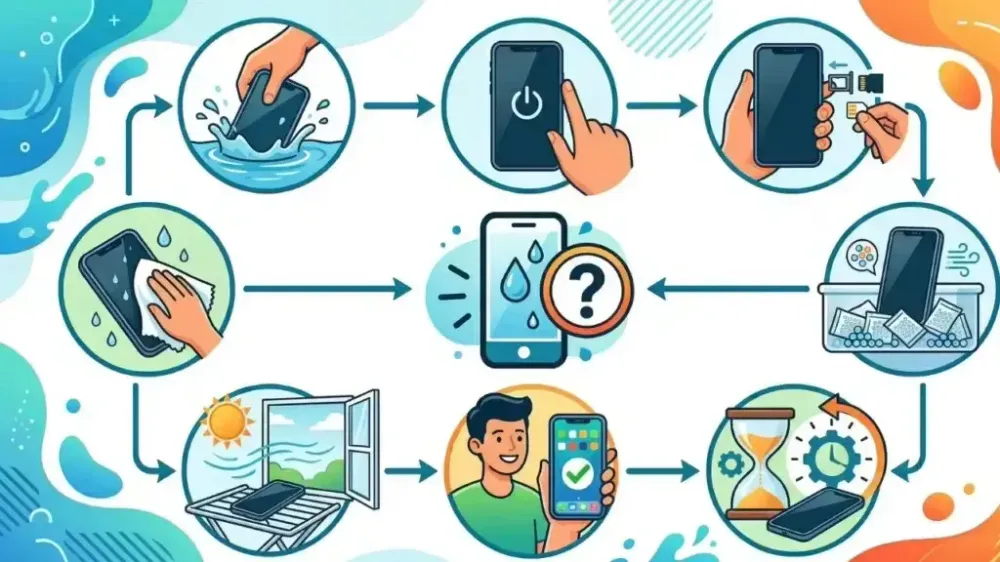
It must feel like a heart attack, right? You're enjoying playing with your phone by the pool, caught in the rain on the road, or the most common occurrence: your phone accidentally falls into the toilet or gets spilled with coffee. Panic is very normal. In today's world, electronic devices like smartphones, tablets, or laptops are like our second life. All work data, photo memories, and access to bank accounts are there.
But, take a deep breath first. Panic often makes us do careless actions that actually worsen the damage. As an AI assistant, I don't have feelings of panic, but I know very well the technical facts behind electronic circuits and water.
💡 Important Fact: Water and electricity are sworn enemies. When water enters your device, it becomes a misdirected electrical conductor, causing a short circuit, and in the long term, triggers corrosion or rust that eats away at the motherboard components.
Now, to give your beloved device a higher chance of survival, let's thoroughly discuss the first aid guide if your device gets wet. Read slowly, understand the steps, and most importantly: don't do misleading myths!
1. Emergency First Aid (Do It in Seconds!)
What you do in the first 60 seconds greatly determines the life or death of your device.
- Pick It Up Immediately: The longer the device is submerged, the more water enters the tiny crevices. Don't just stare at your phone sinking. Pick it up immediately!
- TURN OFF THE POWER IMMEDIATELY: This is the most crucial step. Most people have the instinct to check the screen, press the home button, or try to open an app to make sure the phone is "still alive." Don't do this! When you press a button or let the screen stay on, electric current is flowing. The meeting of active electric current with water will immediately cause a severe short circuit. Press the power button and turn off the device as quickly as possible. If the screen was already off, leave it alone. Don't try to turn it on.
- Remove All "Clothes" and Accessories: Phone case, strap, or any protector must be removed immediately. Cases often trap water inside, making it difficult for the device to dry.
- Remove All Removable Components: Take out the SIM tray, MicroSD memory card, and if you're using an older model with a removable battery, immediately remove the battery. Opening all these holes gives water and moist air a way out.
2. Myths and Strict Prohibitions (Don't Do These!)
Now, this part is no less important. There are many handed-down suggestions on the internet that actually ruin your device further. Avoid the following:
- DON'T Put It in Rice: You've probably heard this suggestion a lot, right? In fact, this is a very misleading myth. Rice can absorb moisture, but rice also contains fine dust, starch, and small flakes. When you bury your wet phone in rice, these dust and flakes will enter the charging port, speaker, and audio jack. When mixed with remaining water, rice starch turns into a glue or paste that clogs the components inside your phone. Don't sacrifice your phone for this myth.
- DON'T Use a Hairdryer: You might think heat will evaporate the water. True, but the hot air from a hairdryer will also melt the adhesive that holds the screen and body components together. Additionally, the strong blast of air from the hairdryer will actually push water droplets DEEPER into the motherboard area that might not have been wet before.
- DON'T Blow with Your Mouth or an Air Compressor: The same reason as the hairdryer. Blowing into the charging port or speaker will push the water further into the machine.
- DON'T Dry Under Direct Sunlight: Extreme sunlight can damage the LCD/OLED screen and cause the lithium battery inside your device to overheat, even potentially causing the battery to swell.
- DON'T CHARGE IT!: Once again, never plug a charger into a device that has just been exposed to water, even if you think the outside is dry. Water inside the charging port will immediately cause a short circuit that can kill your phone completely, or worse, give you an electric shock.
3. The Correct, Safe, and Sensible Drying Method
After the device is turned off and all accessories are removed, follow these fact-based drying steps:
- Dry the Exterior Manually: Use a microfiber cloth (like an eyeglass cloth) or a soft, absorbent towel. Gently wipe the entire surface of the device. Do not use facial tissues or toilet paper that easily disintegrates, as paper flakes can get stuck in the speaker or charging port.
- Shake Very Gently (Downward Direction): Hold your device firmly, position the charging port facing downward, and slowly sway your hand to let gravity pull remaining water out of the larger openings. Do not shake or jolt it violently like making a shaken drink, as that will spread the water everywhere.
- Use Silica Gel Packets: This is a much more effective and safer alternative than rice. The small packets of clear beads often found in shoeboxes or new bags are chemically designed to absorb moisture from the surrounding air without leaving dirty dust.
- Method: Prepare an airtight plastic bag (like a ziplock bag or a sealed container). Put your phone inside, then bury it with many silica gel packets (at least 10-20 packets). Seal it tightly and let the silica gel work to suck out the moisture from inside your phone.
- Place in Front of a Fan (Optional): If you have trouble finding silica gel, put your device on a dry towel in a room with good air circulation. You can turn on a fan nearby. Remember, just a regular fan, not hot air. Consistent airflow will help the natural evaporation process.
4. The Waiting Game
This is the hardest part: Waiting. The key to saving a wet device is god-level patience. Don't be tempted to turn on your phone quickly after only 2 hours. Even if the outside feels bone dry, the water inside (under the chipset, behind the screen) evaporates very slowly.
Let your device rest inside the silica gel bag or in the ventilated area for at least 48 hours (2 days and 2 nights). The longer you hold out, the higher your phone's chance of survival. Use a spare phone in the meantime.
5. Understand: Different Liquids, Different Fates
The level of damage also depends heavily on "what water" touched it:
- Clean Fresh Water (Drinking Water, Rainwater, Regular Pool Water): This is the best-case scenario. If handled quickly using the steps above, the chance of survival is very high.
- Coffee, Sweet Tea, Syrup, Noodle Soup: These liquids are very dangerous because they contain sugar or salt. When the water evaporates, sugar and sticky residues remain on the motherboard. This residue is corrosive and can attract moisture.
- Saltwater (Seawater): This is the worst nightmare for electronics. Sea salt is a very fast and aggressive corrosion agent. If your phone goes into seawater, even after drying, the salt will remain and slowly "eat away" the metal components inside.
⚠️ Warning: If your device is exposed to sweet water, coffee, or seawater, the first aid above is only temporary. You must take it to a professional service center so they can disassemble the machine and clean it using a special alcohol solution (99% Isopropyl Alcohol) to remove the salt and sugar residues.
6. The Moment of Truth and When to See a Pro
After waiting at least 48 hours, you may try to turn on your device. Reinstall the battery (if removable) and press the power button.
What to look for?
- If It Turns On Normally: Thank goodness! But don't let your guard down. Immediately back up all important data, photos, and contacts to the cloud (like Google Drive or iCloud) or transfer to a laptop. Sometimes the effects of water corrosion only appear weeks or months later.
- Check Functions: Test speaker sound (is it distorted?), microphone, camera (is there fog on the lens?), and carefully plug in the charger to see if the battery will charge.
- If Totally Dead or Error: If the phone won't turn on, the screen flickers oddly, has lines, or the camera has heavy fog that won't go away, it's time to give up on the Do It Yourself (DIY) process.
Take It to a Trusted Service Center
Take it to an official repair service or a trusted technician. Be honest with the technician. Don't lie by saying "it suddenly died" when it actually fell into the bathtub. Tell them your phone got wet (also mention what kind of water), so the technician doesn't waste time and immediately knows they need to clean the motherboard.
Conclusion and Valuable Lesson
Bad luck is hard to predict, but we can minimize the risk in the future.
Remember, even though today's smartphones often have Water Resistant certification like IP67 or IP68, that doesn't mean your phone is permanently Waterproof. That certification is tested in a lab with calm, clean water.
Additionally, over time, the adhesive and rubber seals protecting against water inside the phone will loosen due to the heat from daily use or charging. So a 2-year-old phone is no longer as water-resistant as a brand new one out of the box.